Insurance Quoting Software: Complete Comparison Guide
Most insurance agents quote the hard way. They visit Carrier A's website. Enter client info. Get a quote. Visit Carrier B's website. Enter the same info again. Get another quote. Repeat for 5 carriers. The result? 2 hours spent. One quote sent. Client already bought elsewhere.
Top agents use quoting software. They enter client info once. Get quotes from 10 carriers instantly. Compare side-by-side. Send the best option in minutes. The result? 15 minutes spent. 10 quotes compared. Client gets the best rate.
This guide shows you which quoting software to use and how to implement it. If you also need help managing policies and commissions after the quote, see our guide to insurance agency management systems.
What Is Insurance Quoting Software?
Insurance quoting software is a platform that generates quotes from multiple insurance carriers in one place. Instead of visiting each carrier's website individually, you enter client information once (name, address, coverage needs, risk factors) and the software pulls rates from all available carriers simultaneously, displays quotes side-by-side for easy comparison, calculates total premiums and coverage differences, generates professional quote documents, and integrates with your CRM to save client information automatically. The goal is getting accurate quotes from multiple carriers in minutes instead of hours.
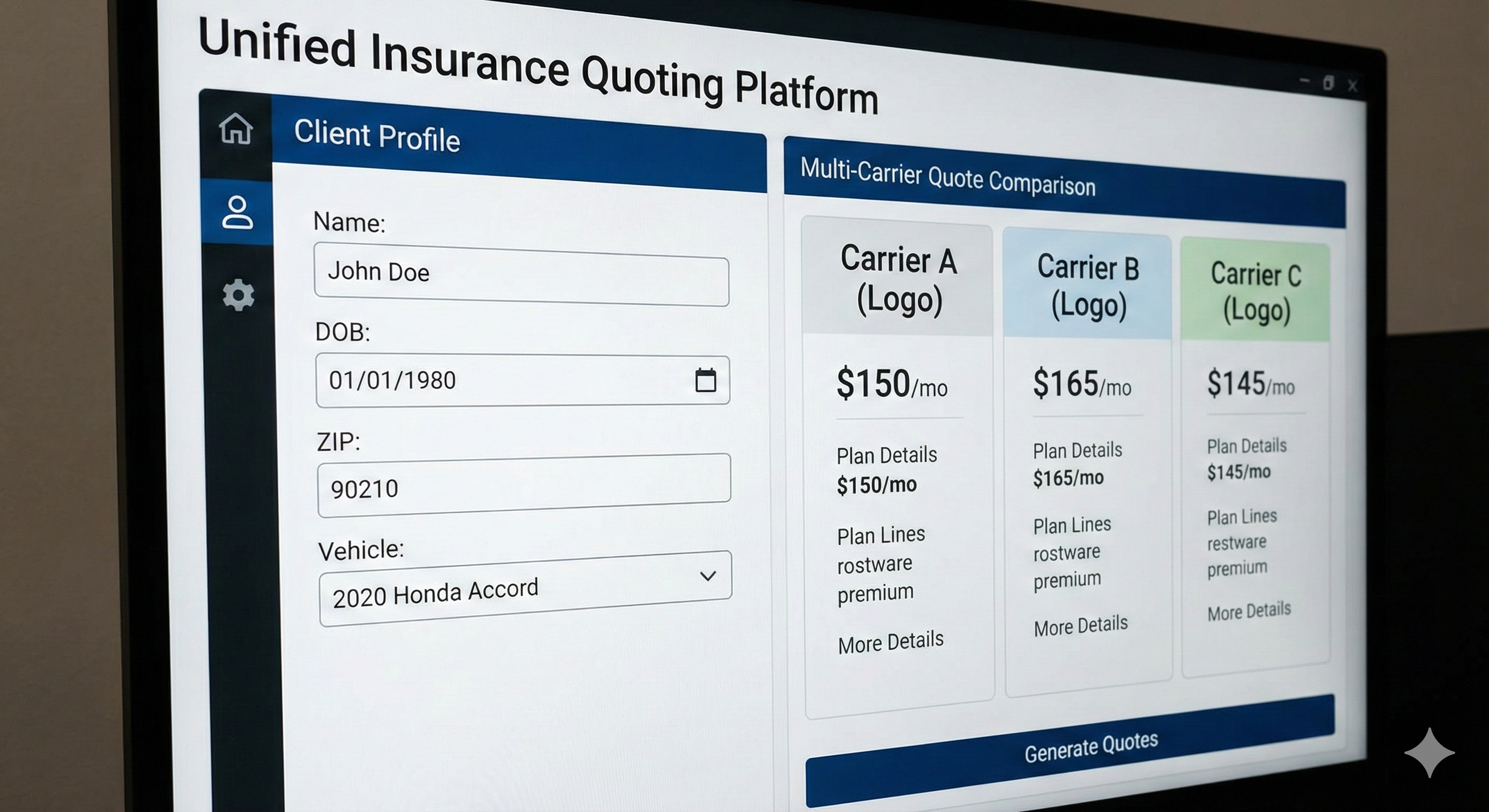
One entry. Multiple quotes. Instant comparison.
Key Features of Quoting Software
1. Comparative Rating
What It Does:
- Pulls quotes from multiple carriers
- Displays rates side-by-side
- Highlights best value options
- Shows coverage differences
Why It Matters:
- Clients see all options
- You recommend the best fit
- Faster decision-making
- Higher close rates
2. Real-Time Rates
What It Does:
- Connects to carrier systems
- Pulls current rates instantly
- Updates as you change criteria
- Reflects latest pricing
Why It Matters:
- Accurate quotes
- No outdated rates
- Faster quoting process
- Better client trust
3. Coverage Comparison
What It Does:
- Compares coverage limits
- Highlights differences
- Shows what's included/excluded
- Explains coverage options
Why It Matters:
- Clients understand options
- You explain value clearly
- Fewer coverage questions
- Better client education
4. Document Generation
What It Does:
- Creates professional quote documents
- Includes carrier logos
- Formats for client presentation
- Saves as PDF or email
Why It Matters:
- Professional appearance
- Easy to share
- Saves formatting time
- Better client experience
5. CRM Integration
What It Does:
- Saves quotes to CRM automatically
- Creates client records
- Tracks quote history
- Links to policies
Why It Matters:
- No manual data entry
- Complete client view
- Quote tracking
- Better organization
Top Insurance Quoting Software
1. EZ Lynx (Best for Small Agencies)
Price: $50-150/month
Features:
- Comparative rating
- Multiple carriers
- Real-time rates
- Document generation
- CRM integration
- Mobile app
Best For: Small agencies (1-5 agents) who want affordable quoting.
Limitations:
- Fewer carriers than enterprise options
- Basic reporting
The Math: $50/month = $600/year. If it saves 5 hours monthly at $50/hour, ROI is 4x in the first year.
2. Applied Epic Quotes (Best for Large Agencies)
Price: Included with Applied Epic ($200-400/user/month)
Features:
- Full agency management + quoting
- Extensive carrier network
- Advanced reporting
- Policy management
- Commission tracking
Best For: Large agencies already using Applied Epic.
Limitations:
- Only if you use Applied Epic
- Higher price point
The Math: If you're paying for Applied Epic anyway, quoting is included. No extra cost.
3. Vertafore Rating (Best for P&C)
Price: $150-300/user/month
Features:
- P&C focused
- Comparative rating
- Carrier integrations
- Real-time rates
- Mobile access
Best For: Property and casualty agencies.
Limitations:
- P&C focused (less for life/health)
- Higher price point
The Math: Similar to Applied Epic. Worth it for P&C agencies quoting 50+ policies monthly.
4. Quotit (Best for Health & Life)
Price: Custom pricing
Features:
- Health and life focused
- Comparative rating
- Carrier integrations
- Benefit comparison
- Enrollment tools
Best For: Health and life insurance agents.
Limitations:
- Health/life focused (less for P&C)
- Custom pricing (not transparent)
The Math: Worth it if you quote 30+ health/life policies monthly.
5. Bold Penguin (Best for Commercial)
Price: Free for agents
Features:
- Commercial insurance focus
- Free for agents
- Comparative rating
- Carrier network
- Application submission
Best For: Commercial insurance agents.
Limitations:
- Commercial focused (less for personal lines)
- Limited carriers
The Math: Free is hard to beat. Worth trying if you write commercial.
Carrier-Specific Quoting Tools
Many carriers provide free quoting tools to their agents:
State Farm: Agent portal with quoting Allstate: Allstate Agency Advantage Progressive: Progressive Agent Portal Farmers: Farmers Agent Portal Liberty Mutual: Agent portal
The Rule: If you're captive to one carrier, use their free tool. If you're independent, you need comparative rating software. Not sure which CRM to pair with your quoting tool? Start with the best free CRM for insurance agents to keep costs low.
Quoting Workflow Example
Step 1: Enter Client Information
- Name, address, contact info
- Coverage needs
- Risk factors
- Current coverage (if applicable)
Step 2: Generate Quotes
- Software pulls rates from all carriers
- Displays quotes side-by-side
- Highlights best options
- Shows coverage differences
Step 3: Compare Options
- Review rates
- Compare coverage
- Identify best value
- Note carrier differences
Step 4: Create Quote Document
- Generate professional document
- Include carrier logos
- Format for client
- Save to CRM
Step 5: Present to Client
- Email quote document
- Explain options
- Answer questions
- Close the deal
The Math: Manual quoting takes 2 hours for 5 carriers. Software takes 15 minutes. That's 8x faster.
Integration Checklist
Your quoting software should connect to:
CRM Systems:
- HubSpot, Salesforce, Pipedrive
- Saves quotes automatically
- Creates client records
- Tracks quote history
Agency Management:
- Applied Epic, AgencyBloc
- Links quotes to policies
- Tracks commissions
- Manages renewals
Email:
- Sends quotes via email
- Tracks email opens
- Follows up automatically
Carrier Portals:
- Submits applications
- Tracks policy status
- Manages binders
The Rule: If quoting software doesn't integrate with your CRM, you're creating manual work. Fix it.
Common Quoting Mistakes
Mistake 1: Not Comparing Enough Carriers Don't quote from 2 carriers. Quote from 5-10. Clients want options.
Mistake 2: Not Explaining Coverage Differences Rates matter, but coverage matters more. Explain what clients get for the price.
Mistake 3: Using Outdated Rates Always use real-time rates. Outdated rates create problems at binding.
Mistake 4: Not Saving Quotes Save every quote to your CRM. You'll need them for renewals and comparisons.
Mistake 5: Not Following Up Send quote, then follow up. Don't assume clients will call you. Need help with that process? See our guide to lead generation tools for insurance agents for tools that automate post-quote outreach.
When You Need Quoting Software
You Need It When:
- You work with 3+ carriers
- You quote 10+ policies monthly
- Manual quoting takes 10+ hours weekly
- Clients want multiple options
- You're losing deals to competitors
You Don't Need It When:
- You're captive to one carrier
- You quote <5 policies monthly
- Manual quoting works fine
- You have carrier-specific tools
The Rule: If manual quoting is eating your time, you need software. Time saved = more selling time.
ROI Calculation
Costs:
- Software: $50-300/month
- Setup time: 2-5 hours
- Learning curve: 2-5 hours
Savings:
- Time saved: 5-10 hours weekly
- More quotes sent: 3-5x volume
- Higher close rates: Better options = more sales
The Math: If software saves 7 hours weekly at $50/hour = $350/week = $18,200/year. Software costs $1,200/year. ROI is 15x. Plus, you send more quotes and close more deals.
The Bottom Line
Insurance quoting software generates quotes from multiple carriers in minutes instead of hours. It compares options side-by-side and helps clients make informed decisions.
Choose based on your product focus (P&C, life/health, commercial) and budget. Start with EZ Lynx for affordability. Upgrade to Applied Epic or Vertafore for advanced features.
The goal isn't to have the most expensive software. It's to quote faster and close more deals. If your bottleneck is getting leads to the right agent for quoting, lead distribution software solves that problem.
Want to see how top agents use quoting software in their workflow? Check out our lead generation courses that include quoting strategies.
Need leads to quote? Buy pre-branded leads that are already qualified before they call.