Lead Distribution Software: How to Route Leads Automatically
Most insurance agencies lose 78% of leads because they respond too slowly. The lead comes in. It sits in an inbox. An agent checks email two hours later. By then, the prospect already called three competitors.
Lead distribution software fixes this. It captures leads instantly. Routes them to the right agent. Sends notifications. Tracks response times. The result? Leads get contacted in under 5 minutes instead of 2 hours. Conversion rates jump 900%.
This guide shows you how lead distribution software works, which tools to use, and how to set it up so no lead ever sits unclaimed. Distribution is one piece of the puzzle -- for the full system, see our guide to lead management automation.
What Is Lead Distribution Software?
Lead distribution software automatically routes incoming leads to the right agent based on rules you configure. It captures leads from multiple sources (website forms, phone calls, chat widgets, Facebook Ads), applies routing rules (geography, product type, agent capacity, round-robin), assigns the lead to an agent, sends instant notifications, and tracks response times. The goal is getting leads to agents in under 60 seconds so they can respond while the prospect is still engaged.
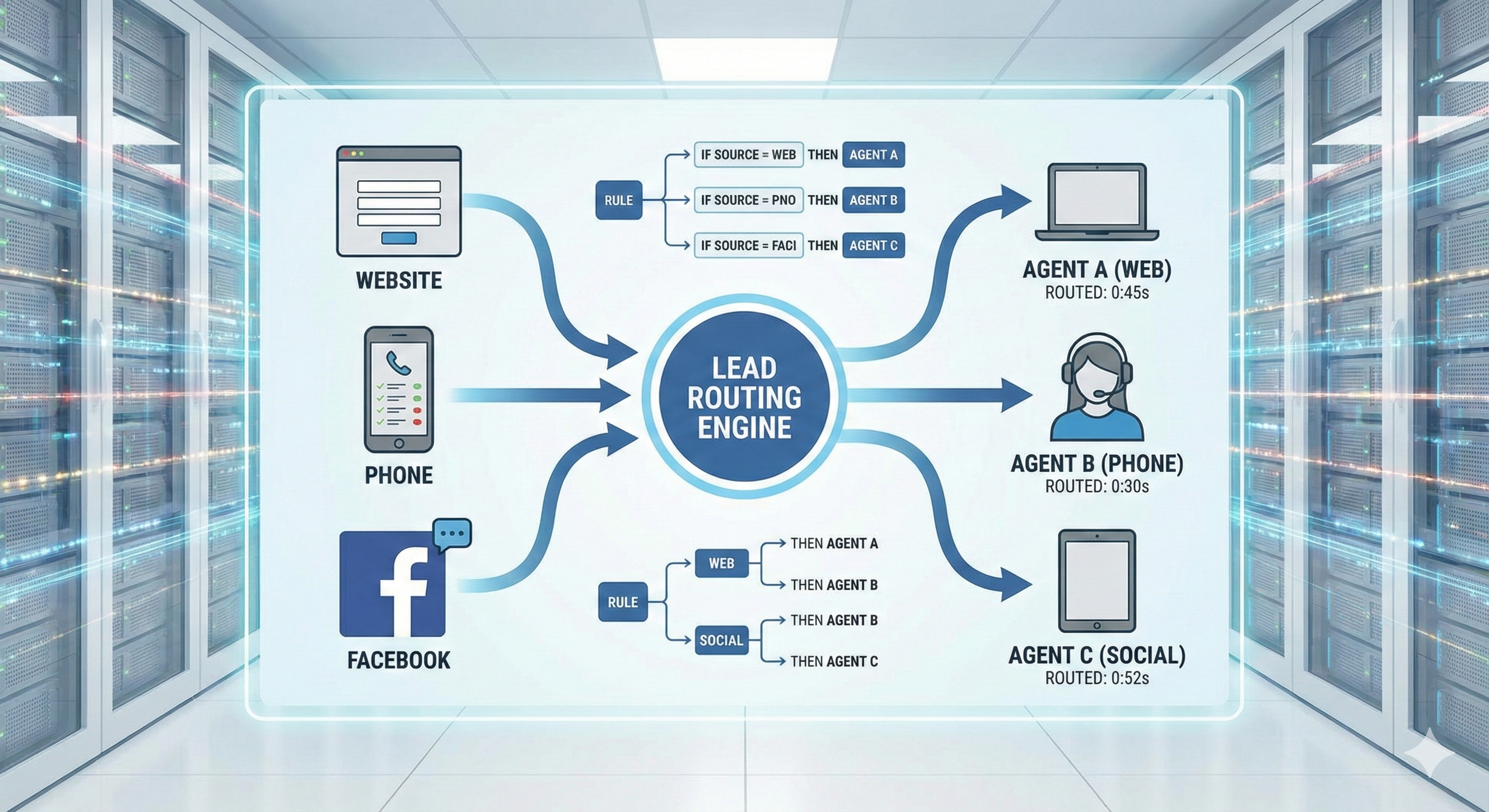
Speed wins. Distribution software ensures speed.
How Lead Distribution Software Works
Step 1: Lead Capture
- Lead fills out form on your website
- Or calls your tracking number
- Or chats via widget
- Software captures contact info instantly
Step 2: Rule Application
- Software checks your routing rules
- Geography: Is lead in Agent A's territory?
- Product: Does Agent B handle life insurance?
- Capacity: Is Agent C available (not at max leads)?
- Round-robin: Is it Agent D's turn?
Step 3: Assignment
- Software assigns lead to chosen agent
- Creates record in CRM automatically
- Tags lead with source and assignment reason
Step 4: Notification
- Agent receives instant notification
- Email, SMS, Slack, or in-app alert
- Includes lead details and contact info
Step 5: Tracking
- Software tracks response time
- Monitors if lead was contacted
- Reports on conversion rates by agent
The Math: Leads contacted within 5 minutes convert at 21%. Leads contacted after 30 minutes convert at 2%. Distribution software ensures you're in the 5-minute window.
Top Lead Distribution Software Options
1. Chili Piper (Best for High-Volume Agencies)
Price: $25-75/user/month
Features:
- Instant scheduling (lead books call immediately)
- Calendar integration
- Round-robin and skill-based routing
- Multi-channel capture (web, phone, chat)
- Real-time notifications
Best For: Agencies generating 100+ leads monthly who want instant engagement.
Limitations:
- Requires calendar integration
- More expensive than basic options
The Math: If you're generating 100 leads/month and Chili Piper increases conversion by 5%, that's 5 extra deals. At $2,000 commission per deal, ROI is 10x.
2. Pipedrive LeadBooster (Best for Pipedrive Users)
Price: Included with Pipedrive ($14-99/month)
Features:
- Web-to-lead forms
- Automatic lead assignment
- Email notifications
- Built into Pipedrive CRM
Best For: Agents already using Pipedrive who want simple distribution.
Limitations:
- Only works with Pipedrive
- Basic routing rules (not as advanced as dedicated tools)
The Math: If you're paying for Pipedrive anyway, LeadBooster adds distribution for free.
3. LeadProsper (Best for Insurance Agencies)
Price: Custom pricing (typically $99-199/month)
Features:
- Insurance-specific routing
- Real-time distribution
- Multi-agent support
- Policy type routing
- Commission tracking
Best For: Multi-agent insurance agencies who need industry-specific features.
Limitations:
- Custom pricing (not transparent)
- Insurance-focused (may not fit other industries)
The Math: Insurance-specific features justify the cost if you're routing 50+ leads monthly across multiple agents.
4. Ringy (Best for Life Insurance Agencies)
Price: $99-199/month
Features:
- Built for life insurance
- Policy tracking included
- Round-robin distribution
- Phone integration
- CRM included
Best For: Life insurance agencies who want distribution + CRM in one tool.
Limitations:
- Life insurance focused (less flexible)
- Higher price point
The Math: If you need CRM + distribution, Ringy costs less than buying both separately.
5. Zapier/Make (Best for DIY Setup)
Price: $20-50/month
Features:
- Connect any tools
- Custom routing logic
- Unlimited flexibility
- Works with existing CRM
Best For: Tech-savvy agents who want full control and already use Zapier.
Limitations:
- Requires setup time (5-10 hours)
- No built-in tracking
- You build the logic yourself
The Math: $50/month + 10 hours setup = $500 investment. Worth it if you route 50+ leads monthly and want full control.
Routing Rules: How to Assign Leads
Rule 1: Geography
- Assign leads based on zip code or state
- Example: California leads → Agent A, Texas leads → Agent B
- Best for: Agents with defined territories
Rule 2: Product Type
- Route by insurance product
- Example: Life insurance → Agent A, Health insurance → Agent B
- Best for: Agencies with product specialists
Rule 3: Round-Robin
- Rotate leads evenly among agents
- Example: Lead 1 → Agent A, Lead 2 → Agent B, Lead 3 → Agent A
- Best for: Teams with similar skills
Rule 4: Capacity-Based
- Assign to agent with fewest active leads
- Example: Agent A has 5 leads, Agent B has 2 → Assign to Agent B
- Best for: Balancing workload
Rule 5: Skill-Based
- Route to agent with best conversion rate for product/geography
- Example: Life insurance in California → Agent A (35% close rate)
- Best for: Maximizing conversion
Rule 6: Lead Source
- Route by where lead came from
- Example: Facebook Ads → Agent A, Website → Agent B
- Best for: Testing different agents on different sources
The Rule: Start with one rule (geography or round-robin). Add complexity as you learn what works.
Integration Checklist
Your distribution software must connect to:
Lead Sources:
- Website forms (Leadpages, Unbounce)
- Facebook Lead Ads
- Google Ads (form extensions)
- Phone calls (call tracking)
- Chat widgets (Intercom, Drift)
CRM System:
- HubSpot, Salesforce, Pipedrive (need help choosing? See insurance agency management systems)
- Creates contact automatically
- Updates pipeline stage
- Tags with source
Notification Systems:
- Email (agent email)
- SMS (agent phone)
- Slack (team channel)
- In-app (CRM notification)
Calendar:
- Google Calendar
- Outlook Calendar
- Calendly (for instant booking)
The Rule: If a lead source doesn't connect to your distribution software, you're losing leads. Fix it immediately.
Response Time Benchmarks
Under 5 Minutes: 21% conversion rate
- This is your target
- Distribution software makes this possible
5-30 Minutes: 8% conversion rate
- Still acceptable
- Most agencies fall here
30-60 Minutes: 4% conversion rate
- Getting weak
- Prospects are shopping competitors
Over 60 Minutes: 2% conversion rate
- Too slow
- You've lost the lead
The Math: If you're responding in 30 minutes and distribution software gets you to 5 minutes, you'll 2.6x your conversion rate. That's worth $200/month. Pair fast distribution with the right lead generation tools for insurance agents to maximize lead volume and speed together.
Common Mistakes That Kill Conversion
Mistake 1: Not Setting Up Notifications If agents don't know a lead arrived, they can't respond. Set up multiple notification channels.
Mistake 2: Over-Complicating Rules Start simple. Geography or round-robin. Add complexity later.
Mistake 3: Not Tracking Response Times If you don't measure, you can't improve. Track everything.
Mistake 4: Ignoring Failed Assignments If a lead isn't assigned (agent unavailable, rules don't match), have a fallback. Route to manager or round-robin.
Mistake 5: Not Testing Test your routing rules with fake leads. Make sure they work before going live.
DIY Setup: Using Zapier for Distribution
You can build basic distribution with Zapier:
Step 1: Capture Lead
- Trigger: New form submission (Leadpages, Google Forms)
- Action: Create contact in CRM
Step 2: Apply Rule
- Trigger: New contact in CRM
- Filter: If state = "California"
- Action: Assign to Agent A (update custom field)
Step 3: Notify Agent
- Trigger: Contact assigned to Agent A
- Action: Send email to Agent A
- Action: Send SMS to Agent A
Limitations:
- Zapier has delays (30-60 seconds)
- Complex rules require multiple Zaps
- No built-in tracking
The Math: Zapier costs $20/month. Dedicated software costs $50-100/month. If you value your time at $50/hour and spend 5 hours setting up Zapier, you've spent $270. Dedicated software might be cheaper.
When You Need Distribution Software
You Need It When:
- You have 2+ agents
- You generate 20+ leads monthly
- Leads sit unclaimed for hours
- You're missing response time targets
- You're routing leads manually (spreadsheet, email)
You Don't Need It When:
- You're a solo agent with <10 leads/month
- You respond to every lead within 5 minutes manually
- Your current system works perfectly
The Rule: If you're losing leads due to slow response, you need distribution software. The cost is less than the lost revenue.
The Bottom Line
Lead distribution software routes leads to agents in under 60 seconds. That speed increases conversion by 900%.
Start with simple rules (geography or round-robin). Add complexity as you scale.
The goal isn't to have the fanciest software. It's to ensure no lead ever sits unclaimed. Once a lead is assigned, make sure your automated lead follow-up system kicks in so the agent never drops the ball.
Want to see how top agencies set up their distribution systems? Check out our lead generation courses that include distribution workflows.
Need leads to distribute? Buy pre-branded leads that are already qualified before they call.