Lead Management Automation: Complete System Guide
Most insurance agents treat lead management like a to-do list. They capture a lead. Add it to a spreadsheet. Send one email. Forget about it. Three months later, they wonder why the lead didn't buy.
Top agents treat lead management like a system. They automate capture, scoring, nurturing, and follow-up. Leads get contacted instantly. Nurtured for weeks. Scored by behavior. Prioritized by value. The result? 35% close rates instead of 8%.
This guide shows you how to build a lead management automation system that works while you sleep. For the specific component of follow-up emails and sequences, see our detailed guide to building an automated lead follow-up system.
What Is Lead Management Automation?
Lead management automation uses software to capture, organize, score, nurture, and track leads through the sales process without manual work. It captures leads from multiple sources automatically, stores them in a CRM, scores them based on behavior (email opens, website visits, form fills), sends automated nurture sequences, routes high-scoring leads to sales, and tracks everything in dashboards. The goal is handling 80% of lead management automatically so you can focus on the 20% that requires human touch (closing deals).
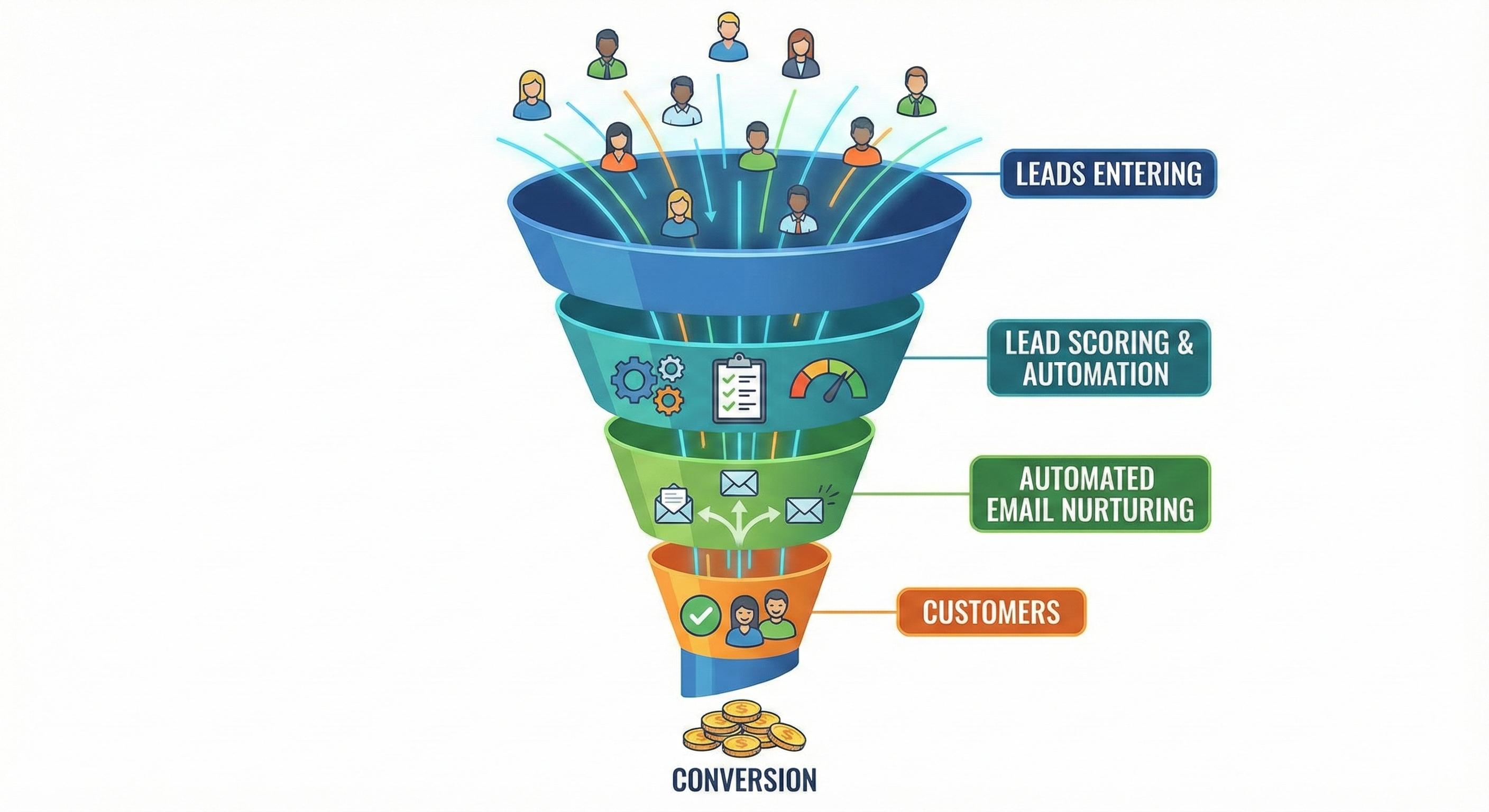
Automation handles the work. You handle the closing.
The 5 Components of Lead Management Automation
1. Lead Capture
What It Does:
- Captures leads from website forms
- Imports from Facebook Lead Ads
- Pulls from Google Ads
- Connects phone calls to CRM
- Tracks chat widget conversations
Tools:
- HubSpot Forms (free)
- Leadpages ($37/month)
- Unbounce ($90/month)
- Zapier ($20/month) for custom capture
The Rule: Every lead source must connect to your CRM automatically. Manual entry kills conversion.
2. Lead Scoring
What It Does:
- Assigns points based on behavior
- Tracks engagement (email opens, clicks)
- Monitors website activity (page visits, time on site)
- Identifies buying signals (pricing page visits, demo requests)
- Prioritizes hot leads
Scoring Examples:
- +10 points: Opened email
- +25 points: Clicked link in email
- +50 points: Visited pricing page
- +100 points: Requested quote
- -10 points: Unsubscribed
Tools:
- HubSpot (free tier includes basic scoring)
- ActiveCampaign ($29/month)
- Pipedrive ($14/month)
- Custom scoring in any CRM with Zapier
The Math: Leads scoring 75+ points convert at 40%. Leads scoring under 25 points convert at 3%. Scoring helps you focus on winners.
3. Lead Nurturing
What It Does:
- Sends automated email sequences
- Educates prospects over time
- Builds trust before the sale
- Re-engages cold leads
- Moves prospects through funnel
Sequence Structure:
- Email 1 (Day 0): Welcome + value proposition
- Email 2 (Day 2): Educational content
- Email 3 (Day 5): Case study or testimonial
- Email 4 (Day 9): Objection handling
- Email 5 (Day 14): Final offer or CTA
- Email 6 (Day 21): Re-engagement or close
Tools:
- Mailchimp (free for 500 contacts)
- ActiveCampaign ($29/month)
- HubSpot ($20/month for Marketing Hub)
- ConvertKit ($29/month)
The Rule: Nurture sequences should be 5-7 emails over 2-4 weeks. Test what works for your audience.
4. Lead Routing
What It Does:
- Routes leads to right agent
- Assigns based on geography
- Routes by product type
- Balances workload
- Sends notifications
Tools:
- Chili Piper ($25/user/month)
- Pipedrive LeadBooster (included)
- Zapier ($20/month)
- Custom routing in CRM
The Math: Leads routed within 60 seconds convert at 21%. Leads routed after 30 minutes convert at 2%. For a deeper dive into routing rules and tools, read our guide to lead distribution software.
5. Reporting & Analytics
What It Does:
- Tracks conversion rates
- Monitors response times
- Reports on lead sources
- Measures ROI by channel
- Identifies bottlenecks
Key Metrics:
- Lead-to-close rate (target: 25-35%)
- Cost per lead (target: $12-20)
- Response time (target: under 5 minutes)
- Email open rates (target: 25-35%)
- Sequence completion rate (target: 40-60%)
Tools:
- HubSpot (free reporting)
- Google Analytics (free)
- Custom dashboards in CRM
- Spreadsheet tracking (manual but free)
Complete Automation Workflow Example
Step 1: Lead Captured
- Prospect fills out form on landing page
- HubSpot captures contact info
- Lead enters CRM automatically
Step 2: Instant Actions
- Welcome email sent (within 5 minutes)
- Lead scored +10 points (form submission)
- Assigned to nurture sequence
- Notification sent to sales team
Step 3: Behavior Tracking
- Lead opens email → +10 points
- Lead clicks link → +25 points
- Lead visits pricing page → +50 points
- Lead score now: 95 points
Step 4: Hot Lead Alert
- Lead score exceeds 75 points
- Automated notification to sales
- Lead moved to "Hot" pipeline stage
- Agent receives alert to call
Step 5: Nurture Continues
- If lead doesn't respond, nurture sequence continues
- Email 2 sent on day 2
- Email 3 sent on day 5
- Lead stays engaged
Step 6: Conversion or Re-engagement
- Lead converts → Moved to "Customer" stage
- Lead goes cold → Moved to monthly newsletter
- Lead unsubscribes → Removed from sequences
The Math: This workflow handles 80% of lead management automatically. You only touch leads when they're hot (scored 75+) or need closing.
Tools for Lead Management Automation
Free Options
HubSpot CRM (Free)
- Lead capture (forms)
- Basic scoring
- Email sequences (1,000 contacts max)
- Pipeline management
- Basic reporting
For a full breakdown of free options, see our comparison of the best free CRM for insurance agents.
Mailchimp (Free for 500 contacts)
- Email sequences
- Automation workflows
- Basic segmentation
- Reporting
Google Sheets + Zapier (Free tier)
- Custom automation
- Unlimited flexibility
- Requires setup time
Paid Options
ActiveCampaign ($29-229/month)
- Advanced automation
- Lead scoring
- Split testing
- CRM included
- Best for: Serious automation needs
HubSpot Marketing Hub ($20-1,200/month)
- Full marketing automation
- Advanced scoring
- Multi-touch attribution
- Best for: All-in-one solution
ConvertKit ($29-79/month)
- Creator-focused
- Visual automation builder
- Subscriber tagging
- Best for: Content creators
Marketo ($1,000+/month)
- Enterprise automation
- Advanced analytics
- Multi-channel campaigns
- Best for: Large agencies
Lead Scoring Models
Model 1: Behavioral Scoring
- Email opens: +10 points
- Link clicks: +25 points
- Website visits: +15 points
- Pricing page: +50 points
- Demo request: +100 points
Model 2: Demographic Scoring
- Company size: +20 points (if large)
- Job title: +30 points (if decision-maker)
- Industry: +15 points (if target industry)
- Geography: +10 points (if in territory)
Model 3: Engagement Scoring
- High engagement: 75+ points
- Medium engagement: 40-74 points
- Low engagement: 10-39 points
- No engagement: 0-9 points
The Rule: Start with behavioral scoring. It's easiest to track and most predictive of buying intent.
Nurture Sequence Templates
Template 1: Educational Nurture (Life Insurance)
- Email 1: "Why Life Insurance Matters" (educational)
- Email 2: "How Much Coverage Do You Need?" (calculator)
- Email 3: "Real Stories: How Life Insurance Saved Families" (case study)
- Email 4: "Common Life Insurance Myths Debunked" (objection handling)
- Email 5: "Get Your Free Quote in 5 Minutes" (CTA)
Template 2: Urgency Nurture (Health Insurance)
- Email 1: "Open Enrollment Ends Soon" (urgency)
- Email 2: "Compare Plans Side-by-Side" (comparison)
- Email 3: "What Happens If You Miss Enrollment?" (fear)
- Email 4: "Last Chance: Get Covered Today" (final CTA)
Template 3: Value Nurture (Annuities)
- Email 1: "How Annuities Create Retirement Income" (education)
- Email 2: "Annuity vs. 401(k): Which Is Better?" (comparison)
- Email 3: "Tax Benefits of Annuities" (benefits)
- Email 4: "Calculate Your Retirement Income" (calculator)
- Email 5: "Schedule Your Free Consultation" (CTA)
The Rule: Test different sequences. What works for life insurance might not work for health insurance.
Common Automation Mistakes
Mistake 1: Over-Automating Don't automate everything. Some conversations need human touch. Automate the repetitive work (emails, scoring, routing). Handle the closing yourself.
Mistake 2: Not Testing Sequences Send your nurture sequences to yourself first. Check for typos, broken links, and timing. Test what works.
Mistake 3: Ignoring Lead Scores If you're scoring leads but not acting on scores, you're wasting time. Set up alerts for high-scoring leads.
Mistake 4: Not Cleaning Lists Remove unsubscribes immediately. Clean bounces regularly. Dead leads hurt deliverability.
Mistake 5: Setting and Forgetting Automation needs monitoring. Review sequences monthly. Update content quarterly. Test new approaches.
When to Automate vs. Manual
Automate:
- Lead capture (forms, imports)
- Initial follow-up (welcome emails)
- Nurture sequences (educational content)
- Lead scoring (behavior tracking)
- Reporting (dashboards)
Keep Manual:
- Closing conversations (needs human touch)
- Handling objections (requires listening)
- Custom proposals (needs personalization)
- Relationship building (requires authenticity)
The Rule: Automate everything that's repetitive. Keep manual everything that requires judgment.
The Bottom Line
Lead management automation handles 80% of lead management automatically. You focus on the 20% that closes deals.
Start with free tools (HubSpot, Mailchimp). Master the basics. Upgrade when you hit limits.
The goal isn't to automate everything. It's to automate the repetitive work so you can focus on selling. To push the envelope further, AI lead generation tools can handle prospect discovery and data enrichment before leads even enter your automation pipeline.
Want to see how top agents set up their automation systems? Check out our lead generation courses that include automation templates.
Need leads to automate? Buy pre-branded leads that are already qualified before they call.