Automated Lead Follow-Up System: Never Lose a Lead Again
Most insurance agents follow up twice. Then they give up. The lead goes cold. Three months later, they wonder why the prospect didn't buy.
Top agents follow up 7-12 times over 21 days. They automate the sequence. Personalize each touch. Provide value every time. The result? 40% of "cold" leads eventually convert. That's 4x higher than agents who follow up twice.
This guide shows you how to build an automated follow-up system that never loses a lead. Follow-up is one piece of the puzzle — for the full picture, see our guide to lead management automation.
What Is an Automated Lead Follow-Up System?
An automated lead follow-up system uses software to contact prospects multiple times over days or weeks without manual work. It sends initial contact within 5 minutes of lead capture, follows up on a schedule (days 2, 5, 9, 14, 21), personalizes each message with the lead's name and details, provides value in every email (education, case studies, tips), tracks engagement (opens, clicks), and routes hot leads to sales when they show buying signals. The goal is maintaining contact until the prospect is ready to buy, which typically takes 5-7 touches.
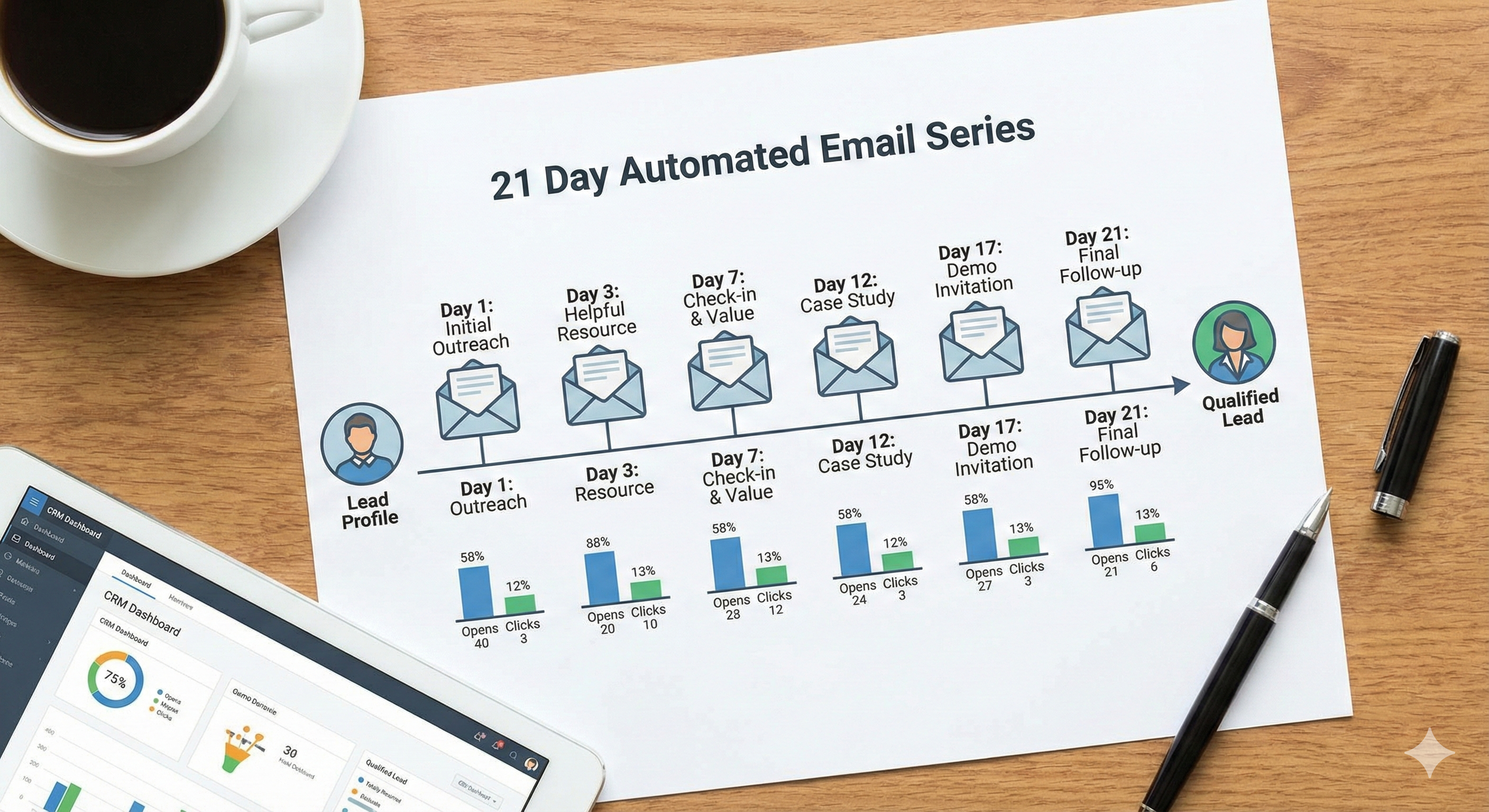
Persistence wins. Automation makes persistence possible.
Why Most Agents Lose Leads
The Problem:
- 80% of sales require 5+ follow-ups
- Most agents follow up 2 times
- 44% of agents give up after 1 follow-up
- Only 8% of agents follow up 5+ times
The Result:
- Leads go cold
- Competitors win deals
- Agents blame the leads (not the process)
The Solution:
- Automate follow-up sequences
- Follow up 7-12 times
- Track engagement
- Never give up on a lead
The Math: If 80% of sales need 5+ follow-ups and you're only doing 2, you're losing 60% of potential deals. Automation fixes this. Need more leads to feed your follow-up system? Start with proven insurance lead generation strategies.
The 7-Touch Follow-Up Sequence
Touch 1: Immediate (Within 5 Minutes)
- Welcome email
- Thank them for interest
- Set expectations (what happens next)
- Provide immediate value (free resource, guide)
Touch 2: Day 2
- Educational content
- Answer common questions
- Build trust
- No sales pitch
Touch 3: Day 5
- Case study or testimonial
- Social proof
- Show results
- Soft CTA (learn more, not buy now)
Touch 4: Day 9
- Objection handling
- Address common concerns
- Provide reassurance
- Value-focused
Touch 5: Day 14
- Final offer or CTA
- Clear next step
- Sense of urgency (if appropriate)
- Make it easy to respond
Touch 6: Day 21
- Re-engagement email
- "Haven't heard from you" message
- Final value offer
- Last chance CTA
Touch 7: Day 30+
- Move to monthly newsletter
- Keep them engaged
- Share industry insights
- Stay top-of-mind
The Rule: Space emails 2-5 days apart. Too frequent (daily) feels spammy. Too infrequent (weekly) loses momentum.
Tools for Automated Follow-Up
Free Options
Mailchimp (Free for 500 contacts)
- Email sequences
- Basic automation
- Templates included
- Best for: Solo agents starting out
HubSpot CRM (Free)
- Email sequences (1,000 contacts max)
- Basic automation
- CRM included
- Best for: Agents who want CRM + email (see our full comparison of the best free CRM for insurance agents)
Gmail + Boomerang (Free tier)
- Email scheduling
- Follow-up reminders
- Basic automation
- Best for: Simple follow-up needs
Paid Options
ActiveCampaign ($29-229/month)
- Advanced automation
- Visual workflow builder
- Lead scoring
- Best for: Serious automation needs
ConvertKit ($29-79/month)
- Creator-focused
- Visual sequences
- Subscriber tagging
- Best for: Content creators
Drip ($39-159/month)
- E-commerce focused
- Advanced segmentation
- Revenue tracking
- Best for: Product-focused agents
The Math: If automation increases conversion by 5% and you generate 50 leads/month, that's 2.5 extra deals. At $2,000 commission per deal, ROI is 17x on a $29/month tool.
Follow-Up Email Templates
Template 1: Welcome Email (Day 0)
Subject: Thanks for your interest, [Name]
Hi [Name],
Thanks for requesting information about [Product/Service]. I know you're probably researching options, so I want to make this easy for you.
I've attached a free guide: "[Resource Name]" that answers the top 10 questions most people have about [Topic].
In the next few days, I'll send you:
- Real stories from clients like you
- Common mistakes to avoid
- How to choose the right [Product/Service]
If you have questions before then, just reply to this email. I check it daily.
Talk soon, [Your Name]
Why It Works: Provides immediate value, sets expectations, makes you accessible.
Template 2: Educational Email (Day 2)
Subject: [Topic]: What You Need to Know
Hi [Name],
Most people I talk to ask the same question: "[Common Question]"
Here's the short answer: [2-3 sentence explanation]
The longer answer depends on your situation. That's why I created this guide: [Link to Resource]
It covers:
- [Benefit 1]
- [Benefit 2]
- [Benefit 3]
No sales pitch. Just information to help you make the best decision.
Questions? Hit reply.
[Your Name]
Why It Works: Answers questions, provides value, no pressure.
Template 3: Case Study Email (Day 5)
Subject: How [Client Name] Solved [Problem]
Hi [Name],
[Client Name] was in a similar situation to you. They needed [Solution] but weren't sure where to start.
Here's what happened:
- [Challenge they faced]
- [Solution we provided]
- [Result they achieved]
[Client Name] said: "[Testimonial Quote]"
Want to see if this could work for you? Let's talk: [Link to Calendar]
[Your Name]
Why It Works: Social proof, relatable story, soft CTA.
Template 4: Objection Handling Email (Day 9)
Subject: Answering Your [Common Objection] Question
Hi [Name],
I hear this question a lot: "[Common Objection]"
Here's the truth: [Honest Answer]
Many people think [Misconception], but actually [Reality].
Here's what that means for you: [Benefit/Reassurance]
Still have concerns? Let's talk through them: [Link to Calendar]
[Your Name]
Why It Works: Addresses concerns, builds trust, removes barriers.
Template 5: Final Offer Email (Day 14)
Subject: Last chance: [Offer]
Hi [Name],
I've sent you a few emails about [Topic]. If you're still interested, I'd love to help.
Here's what I can do for you:
- [Benefit 1]
- [Benefit 2]
- [Benefit 3]
I have [X] spots available this month for new clients. If you're ready to move forward, let's talk: [Link to Calendar]
If now's not the right time, no problem. I'll keep you on my newsletter for future updates.
Either way, I'm here to help.
[Your Name]
Why It Works: Clear CTA, creates urgency, gives options.
Personalization Strategies
Level 1: Basic Personalization
- Use first name
- Reference company name
- Mention lead source
Level 2: Behavioral Personalization
- Reference pages they visited
- Mention content they downloaded
- Acknowledge their interests
Level 3: Advanced Personalization
- Reference their industry challenges
- Mention similar clients
- Customize based on company size
The Rule: More personalization = higher open rates. But don't overdo it. "Hi [Name]" is better than no personalization, even if it's basic.
Engagement Tracking
Track These Metrics:
- Open rate (target: 25-35%)
- Click rate (target: 5-10%)
- Reply rate (target: 2-5%)
- Unsubscribe rate (target: <0.5%)
What to Do Based on Engagement:
- High engagement (opens + clicks): Move to "Hot" list, prioritize
- Medium engagement (opens only): Continue sequence, test different content
- Low engagement (no opens): Try different subject lines, re-engage
- Unsubscribed: Remove immediately, respect their choice
The Math: If open rates drop below 20%, your subject lines need work. If click rates drop below 3%, your content needs work.
Common Follow-Up Mistakes
Mistake 1: Following Up Too Soon Don't email daily. Space emails 2-5 days apart. Too frequent feels spammy.
Mistake 2: Not Providing Value Every email should provide value (education, tips, resources). Don't just say "checking in."
Mistake 3: Being Too Salesy Don't pitch in every email. Build trust first. Sell later.
Mistake 4: Not Tracking Engagement If you don't know who's engaging, you can't prioritize. Track everything.
Mistake 5: Giving Up Too Early 80% of sales need 5+ follow-ups. Don't give up after 2.
When to Stop Following Up
Stop When:
- Lead explicitly says "no"
- Lead unsubscribes
- Lead becomes a customer
- Lead hasn't engaged in 90+ days (move to newsletter)
Don't Stop When:
- Lead doesn't reply to first email
- Lead doesn't open emails (try different subject lines)
- Lead says "not now" (follow up in 3-6 months)
The Rule: Respect "no." But "not now" isn't "no." Keep nurturing.
The Bottom Line
Automated follow-up systems contact prospects 7-12 times over 21 days. That persistence increases conversion by 400%.
Start with free tools (Mailchimp, HubSpot). Master the basics. Upgrade when you hit limits.
The goal isn't to automate everything. It's to never lose a lead because you forgot to follow up. If you want to take automation further, AI lead generation tools can find and enrich prospects before they even enter your follow-up sequence.
Want to see how top agents set up their follow-up sequences? Check out our lead generation courses that include email templates.
Need leads to follow up with? Buy pre-branded leads that are already qualified before they call.